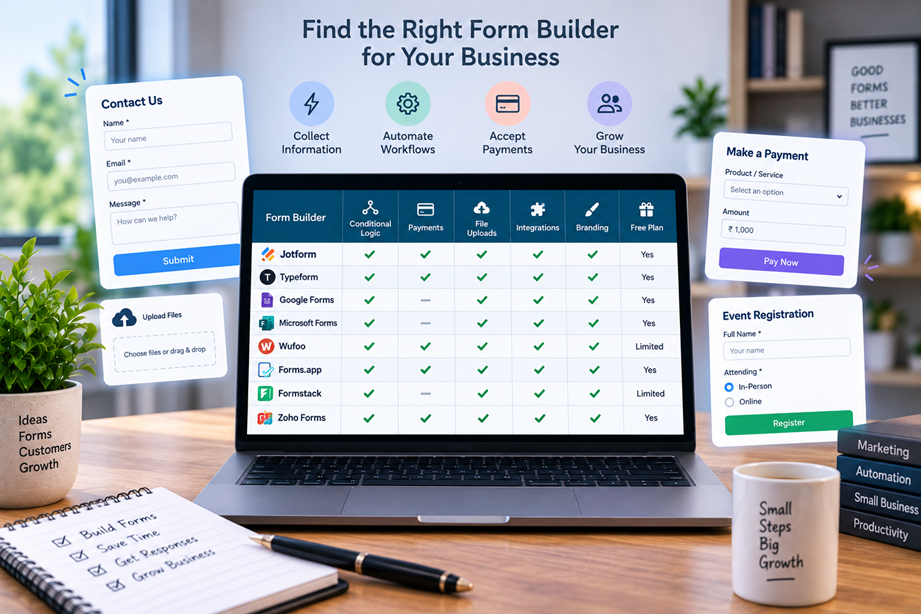
Building an online form is the easy part. The harder question is what happens after someone presses Submit. Does the response go to the right person? Can the form accept files or payments? Can it trigger an email, add a lead to a CRM or route an application for review? The best online form builder for a small business should fit the workflow around the form, not just make the form look good.
When a simple form is enough
Google Forms and other lightweight tools can be perfectly adequate for internal surveys, basic registrations and simple information collection. You do not need a sophisticated platform for every questionnaire.
A more capable form builder becomes worthwhile when you need conditional logic, branded forms, file uploads, payments, multiple workflows, integrations or more control over how submissions are processed.
What small businesses should compare
Look at form design, conditional logic, integrations, notifications, file uploads, payments, signatures, automation, response limits, team access, branding, analytics and data-handling options. Also consider how quickly a non-technical person can build and maintain a form.
Quick comparison
| Builder | Best for | Key strengths | Watch for |
|---|---|---|---|
| Jotform | Complex all-in-one forms | Templates, conditional logic, payments, approvals and integrations | Compare submission limits and paid plan features |
| Typeform | Polished conversational forms | Strong respondent experience, logic and integrations | Response limits can matter at higher volume |
| Tally | Lightweight forms with flexible setup | Simple creation, useful logic and generous low-cost entry | Check advanced features and business needs |
| Fillout | Flexible workflow-connected forms | Conditional logic, integrations and database-connected workflows | Evaluate integrations against your existing stack |
Jotform: strong for complex workflows
Jotform currently offers a broad form-builder environment with templates, conditional logic, payments and integrations. Its 2026 materials also show how form builders are being used for different industries and workflow types rather than simple contact forms alone. citeturn349185search0turn349185search11
Jotform is a good candidate when the form is part of an operational process. The trade-off is that a very simple form may not justify a more capable system.
Typeform: respondent experience first
Typeform is best known for conversational, visually polished forms. That can help when the completion experience is itself part of the goal, such as lead capture, customer research or branded intake.
Before choosing it, compare response limits and the features required for your workflow. A beautiful form is not useful if you hit a volume or integration constraint.
Tally: simple and flexible
Tally is positioned around straightforward form creation with a lightweight interface. It can be attractive when a business wants more flexibility than a basic form but does not want to build a heavy form-management system.
Check which features you actually need—such as advanced logic, payments or integrations—and confirm that they are available on the current plan.
Fillout: form workflows connected to other data
Fillout focuses on forms, logic and connections to other systems. That makes it relevant when the submission should trigger an action elsewhere rather than simply arrive in an inbox.
Evaluate it based on the specific integrations you use. The quality of the connection matters more than the number of integrations advertised.
Conditional logic saves respondents from irrelevant questions
A good intake form asks only what matters. Conditional logic lets the form branch based on previous answers, which can shorten the experience and improve the relevance of the questions.
Before buying, build one realistic branching example. Test what happens when a respondent takes every possible path, including incomplete or unexpected answers.
Lead capture and CRM connections
For marketing or sales forms, the submission is often the beginning of the workflow. The response may need to create a contact, notify a salesperson or start a follow-up sequence.
Compare how reliably the form builder transfers fields into the destination system and whether you can control who receives the notification. A manual copy-and-paste process defeats much of the reason for using an online form.
Payments and paid registrations
Some small businesses use forms to collect deposits, event fees or service payments. Check which payment providers are supported, what fees apply and how payment status is stored with the form response.
Keep payment collection separate from security claims. A form builder can connect a payment service without being the payment processor itself.
File uploads
Client intake forms often need attachments: identification, project briefs, invoices, photos or other documents. Compare file-size limits, accepted formats, storage rules and who can access the uploaded files.
For sensitive files, review the provider's data-handling and privacy information before collecting them through a public form.
Automation and notifications
A form should ideally trigger the next step automatically when the workflow is predictable. Examples include sending an acknowledgement, routing a submission to a team member or updating another system.
Keep automation understandable. A small business does not need twenty hidden rules if three clear actions solve the problem.
Branding and respondent experience
Branded forms can feel more trustworthy, particularly when clients already recognize your website. But branding is only one part of the experience. Check mobile layouts, validation messages, accessibility, loading speed and the final confirmation page.
Response limits and pricing
This is one of the easiest costs to overlook. Compare how many responses you expect each month and how pricing changes as volume grows. Current 2026 comparisons show that form builders can meter responses very differently, so the cheapest starting plan is not always the cheapest at your real usage. citeturn349185search3turn349185search9
Data handling and privacy
Forms can collect names, contact information, financial details and documents. Before collecting anything sensitive, review where data is stored, who can access submissions and what controls the provider offers. Keep the form limited to information you actually need.
Internal forms versus customer-facing forms
An internal employee survey and a customer intake form can have completely different requirements. Internal forms may prioritize speed and simplicity. Customer-facing forms may need branding, payment, attachments and workflow automation.
Best choice by use case
- Complex all-in-one workflow: Jotform.
- Polished respondent experience: Typeform.
- Lightweight flexible form creation: Tally.
- Connected form workflows: Fillout.
How to choose a form builder
- Define what happens after submission.
- List the fields, files and payment steps required.
- Decide whether conditional logic is necessary.
- List the systems the form must connect to.
- Estimate monthly response volume.
- Test the form on a phone and on desktop.
- Review data handling before collecting sensitive information.
Use Tervilo for the surrounding tasks
An online form is often part of a larger workflow. You may still need a calculator, document converter or other Tervilo tool before or after collecting information. Keeping those tasks separate can make the overall process simpler.
Final recommendation
Choose a form builder based on what happens after the response is submitted. Jotform is strong when the workflow is complex, Typeform emphasizes respondent experience, Tally is appealing for lightweight flexible forms, and Fillout is worth considering when forms need to connect closely to other data and systems. Start with the workflow, then choose the builder.
FAQ
What is the best free form builder?
It depends on the use case and response volume. Free plans can be excellent for basic forms, but check logic, integrations and response limits before committing.
Do small businesses need conditional logic?
Only when different answers should lead to different questions or workflows. For a simple contact form, it may add unnecessary complexity.
Can online forms collect payments?
Some form builders can connect payment services. Verify supported providers, fees and regional availability before using a form for paid transactions.
How should I test a form before publishing it?
Complete every major branch yourself, test invalid input, upload a real sample file if supported, and confirm that the final response reaches the intended destination.
Sources checked
Form-builder capabilities and limits can change. Verify current plans, response limits, integrations and data-handling terms before publishing a production form.
Forms should reduce manual work
A form can collect information faster than email, but it creates value only when the response is handled efficiently. Decide where the submission should go, who owns the next step and what should happen when a required field is missing.
Accessibility and mobile completion
Customer-facing forms should be usable on phones and with common assistive technologies. Test labels, error messages, keyboard navigation and control sizes. A form that looks attractive but is difficult to complete can reduce responses.
Spam and abuse controls
Public forms can attract unwanted submissions. Check what protection is available, such as CAPTCHA-style controls, validation and limits, and understand how false positives affect genuine customers.
Workflow ownership after submission
Before publishing a form, assign an owner for responses. Decide who gets notified, where data is stored, how quickly it should be reviewed and what happens after first contact. This turns the form into a business process instead of another inbox.
The goal is a predictable handoff from submission to action. If a response still has to be copied manually into several systems, revisit the form's integrations before adding more design features.
Good forms also make the next step obvious to the person submitting them. A clear confirmation message can tell the user what happens next, when to expect a reply and whether another action is required.